







3.9
Free
Google Input Tools
Type in a language of your choice

View an ad to download for free

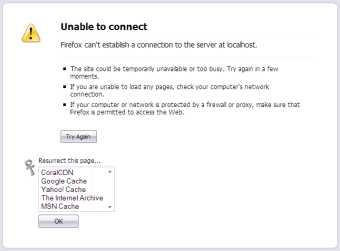
Dead pages, broken links, the scourge of the internet. Powerhouse sites like Slashdot and Digg can bring a server to its knees. What do we do when a page is dead but we still want to see it? Call in the clerics, and perform a resurrection ceremony! Or, the easier route, use this extension.
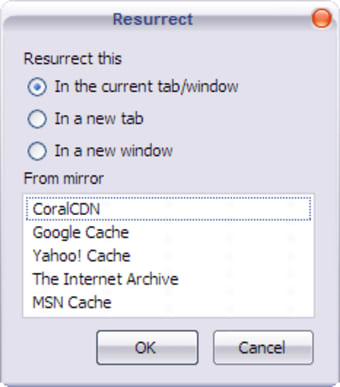
Resurrect Pages searches through five big page cache/mirrors (CoralCDN, Google Cache, Yahoo! Cache, The Internet Archive and MSN Cache) and tries to recover the last cached copy of the website before it went down. Of course, not every page can be in every cache but at least you get a glimpse of the page's contents while waiting for it to be online again.
The resurrection tools are available in three ways:

Browse websites at your leisure without connecting to the internet

Digital Camera Recovery Software Overview

Capture webpages for offline viewing
Free
1.0.8
Windows
Windows 2000
English
879
17.49 KB
View an ad to download for free
Have you tried Resurrect Pages Extension? Be the first to leave your opinion!
Add reviewBrowse websites at your leisure without connecting to the internet
Digital Camera Recovery Software Overview
Capture webpages for offline viewing

Download web pages or entire web sites to browse them offline

Camera Recovery Software Overview

A plug-in for displaying RSS feeds in Firefox

RightToClick: Enhance Your Browsing Experience

The official desktop client for your Pownce account

Efficient Browser Tool for Product Monitoring

Web page analyzer

Enhance Your Browsing with Tab Candy

Secure Password Generation with Pwgen
JiveQ: Free Add-on Tool for Windows Browsers

Enhance Your Browsing with Readability

Ibrii: A Free Add-on Tool for Windows